Made in India
Official User Guide · v1.0
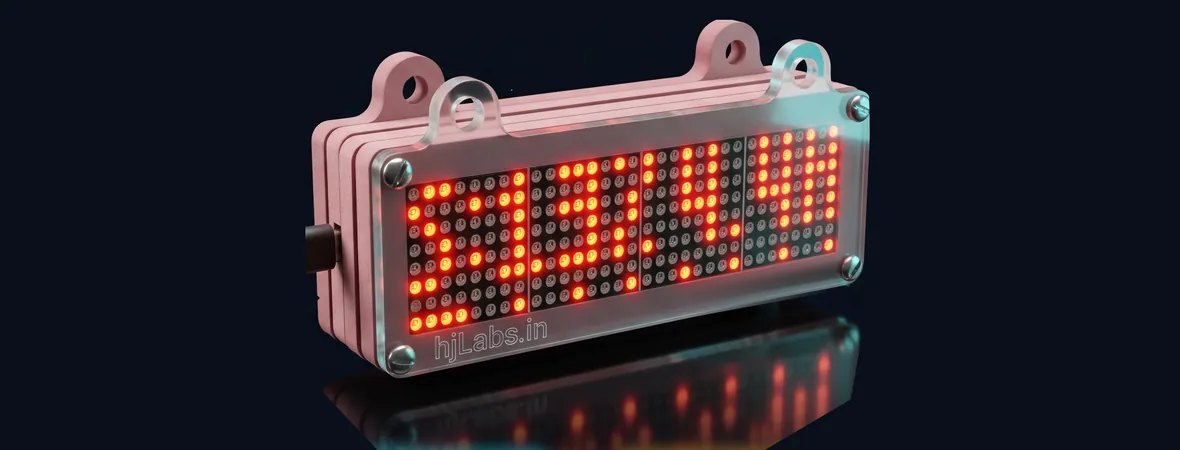
VibeClock
The LED desk clock that keeps your AI usage in sight — plus the time, news, weather and markets.
So you never get cut off by a usage limit by surprise, and the things you glance at all day live in one bright, quiet display on your desk.
VibeClock shows how much of your Claude and ChatGPT Codex limits are left, live, with the time until they reset. Around that it rotates whatever else you choose: the clock, date, weather for your PIN code, news from the publishers you pick, markets, live cricket and football, festivals, reminders and countdowns. Everything is set from a web page on your phone or laptop — no account, no cloud, no subscription.
Claude and Codex session and weekly limits, with reset countdowns.
Clock, weather, news, markets, sports, calendar, reminders and more.
The free app finds the clock on your WiFi. Any browser works too.
New features arrive over WiFi. Nothing to install, no subscription.

VibeClock receives free updates, so a screenshot may differ slightly from your clock. A no-warranty / no-liability notice appears on page 2.


00 · Contents
Every Figure is a screenshot of the VibeClock admin page running on a real clock, captured at 2× so it stays sharp when printed. Numbered balloons sit on the exact control described, and each one has a row in the key under the figure.
| Bold | A control you press or a value you type — Save changes, admin123. |
| mono | An address or command — vibeclock-name.local. |
| ①②③ | A balloon on a figure; the same number is in the key. |
| §04 | A cross-reference. Click it on screen to jump there. |
| Orange box | Useful to know — a tip or a shortcut. |
| Yellow box | Read it: something here can lock you out or lose settings. |
| § | Section |
|---|---|
| 01 | Quick start — from the box to your first panel |
| 02 | The admin page — anatomy of the screen |
| 03 | Panels & rotation — all 19 panels |
| 04 | Clock, date & weather |
| 05 | Claude & Codex usage |
| 06 | News — publishers, sections, filters |
| 07 | Sports — scores, sounds, tournaments |
| 08 | Settings — look, sound, displays, updates |
| 09 | Phone app & network |
| 10 | Text API, agents & arcade |
| 11 | Troubleshooting & support |
| Matrix | The LED display: 32 × 8 dots per module, up to 4 modules side by side. |
| Panel | One thing the matrix shows — the clock, the weather, the news… |
| Rotation | The order the switched-on panels play in, one after another. |
| Marquee | Text that scrolls across the matrix from right to left. |
| Admin page | The clock's own web page where you change everything. |
| Hotspot | The WiFi network the clock creates itself, named VibeClock, for first setup. |
| OTA update | New firmware installed over WiFi, without a cable. |
| Key | Your admin password, also used by scripts and AI agents. |

01 · Quick start
Five steps, about five minutes. Nothing to install on a computer.
Plug the USB cable into a 5 V adapter. The matrix plays the hjLabs intro, then looks for WiFi.
First time only: on your phone, join the WiFi called VibeClock. A setup page opens; if not, open 192.168.4.1.
Pick your home network, type its password, press Connect. The clock joins and the hotspot switches off.
Open the VibeClock app, or the address the matrix scrolls, such as vibeclock-fancy-reef.local.
Factory password: admin123. Tick Remember me. Change the password soon (§08).
Switch panels on, set their seconds, press Save changes. The matrix follows at once.
| Easiest | The VibeClock app lists every clock on your WiFi by name. Tap one. (§09) |
| Read the matrix | Switch on the Network info panel: it scrolls the clock's IP address and name. |
| By name | http://vibeclock-<two words>.local works on most computers and iPhones. |
| By IP | Your router's list of connected devices shows the clock as vibeclock-…. |
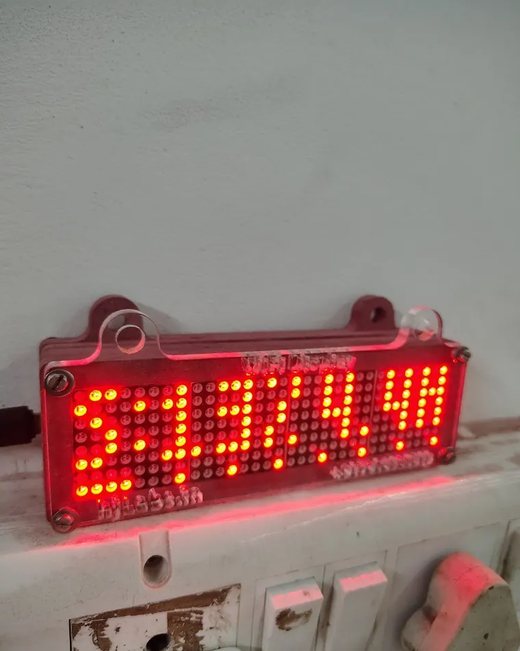
Front — a 32 × 8 red LED matrix behind a clear acrylic face.
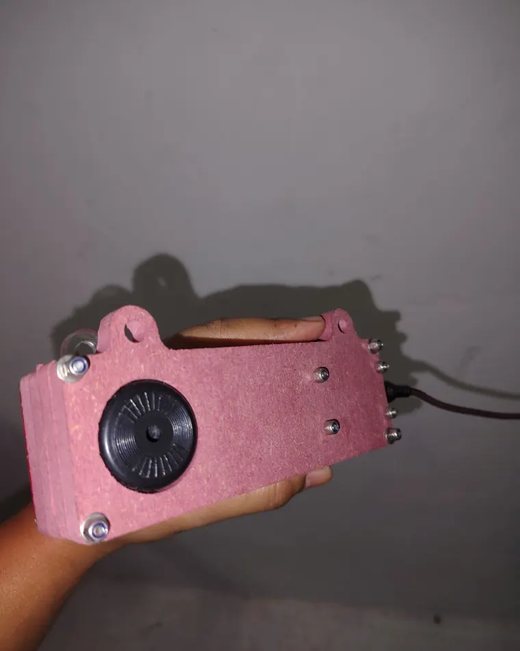
Back — the buzzer for alerts and tunes; the USB power cable enters at the side.
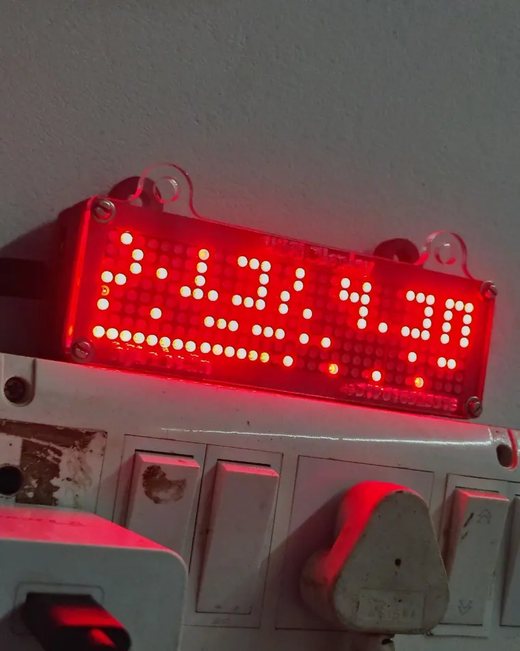
Placement — stands on a desk or shelf; the top tabs let you hang it on a wall.
| What you see | Why | What to do |
|---|---|---|
| No VibeClock hotspot | The clock already joined a saved WiFi. | Read its address from the matrix or use the app. To start over, use Settings → WiFi → Forget network. |
| The .local name does not open | Some Android phones and routers do not support .local names. | Use the app, or the IP address the matrix scrolls. |
| Password is refused | It was changed. | Reset it to admin123 by restarting the clock four times in a row (§11). |
| Matrix is blank or dim | Brightness 0, or a weak USB adapter. | Raise Brightness in Settings; use a 5 V / 1 A adapter. |

02 · The admin page
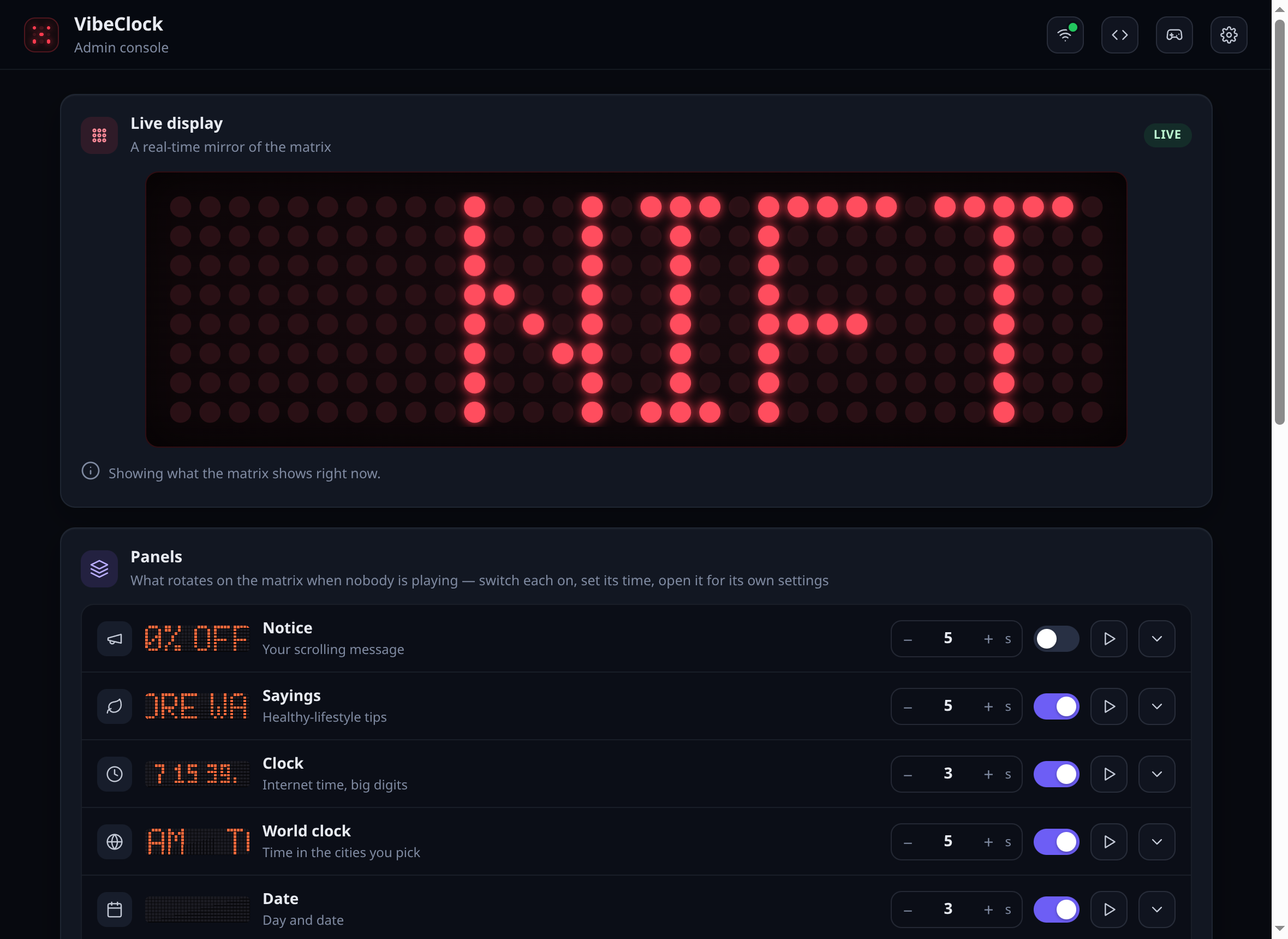
One scrolling page: a live mirror of the matrix at the top, then every panel in the order it plays.
1
2
3
4
5
6
7
8
9
10
11
12
13
Figure 02.1 — The admin page, 1180 × 860 logical px, firmware 1.9.2.

03 · Panels & rotation
The matrix plays every switched-on panel, top to bottom in the order of the admin list, then starts again.
Exactly the order of the admin page. A panel with nothing set up says so instead of disappearing.
A scrolling line always finishes before the next panel slides in, so you can read every word.
Each panel can scroll faster or slower than the rest. Default follows Settings.
| Panel | What it shows — and where to set it up |
|---|---|
| Notice | Your own scrolling messages, each line switchable — shop offers, welcome notes. |
| Sayings | One healthy-lifestyle tip per turn; edit, switch off or add your own (up to 40). |
| Clock | Big digits or text styles, seconds, 12/24 h, AM/PM marker, blinking colon. §04 |
| World clock | The time in the cities you choose, with your own labels. |
| Date | 12 formats, scrolling or standing still. §04 |
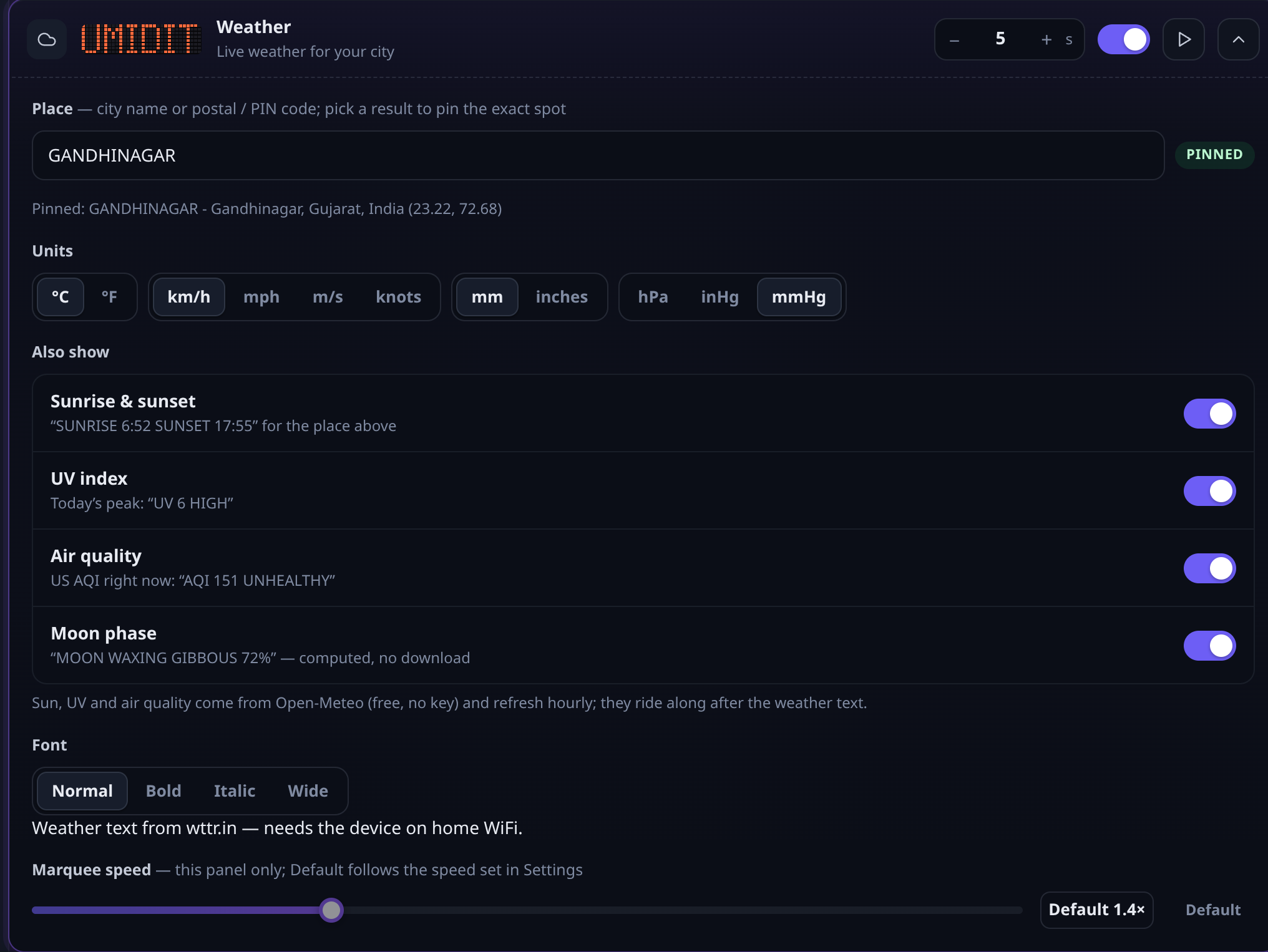
| Weather | Your city or PIN code; temperature, feels-like, humidity, wind, rain, pressure, in your units; sunrise, UV, air quality, moon. §04 |
| Reminders | Up to 6: once, daily or every N minutes within hours; the matrix rings them with beeps. |
| Social counts | YouTube subscribers, GitHub stars and followers, Instagram followers, with milestone celebrations. |
| Countdowns | Days and hours to your dates or festivals, or time since a date. |
| Market ticker | Crypto, stocks, indices and currencies, with price alerts. |
| Dev status | CI build results, website uptime, commits today — with alerts when something goes down. |
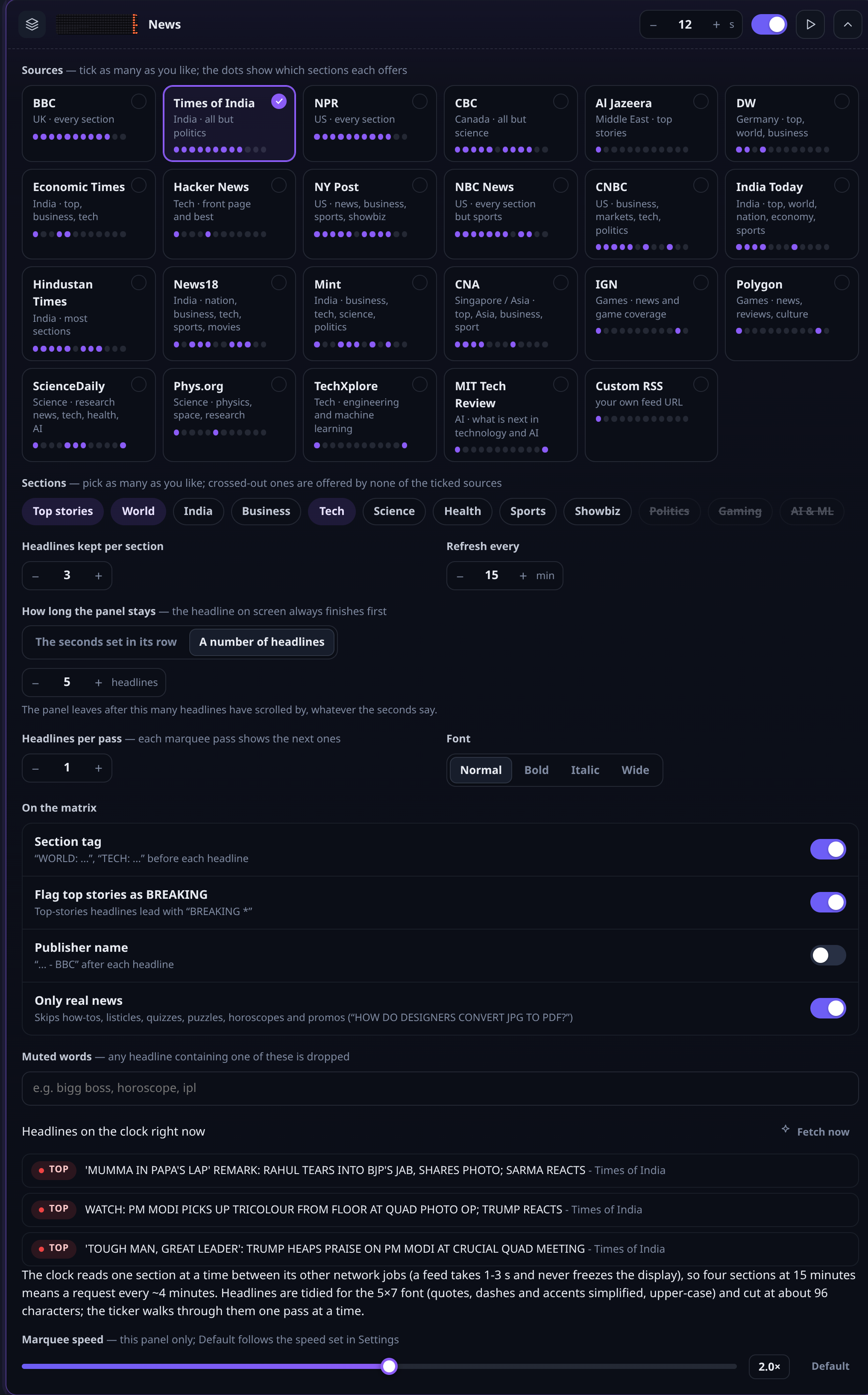
| News | Headlines from 22 publishers by section, with a smart filter. §06 |
| Pixel art | Your own drawings and 15 ambient animations: fire, rain, plasma, fireworks… |
| Calendar | Panchang (tithi, nakshatra, choghadiya), Hijri date, festivals and public holidays incl. India. |
| Queue number | A token number for shops and clinics, with + / − / reset controls and beeps. |
| Claude usage | Claude session and weekly limits, reset times, four looks. §05 |
| Codex usage | The same for ChatGPT Codex. §05 |
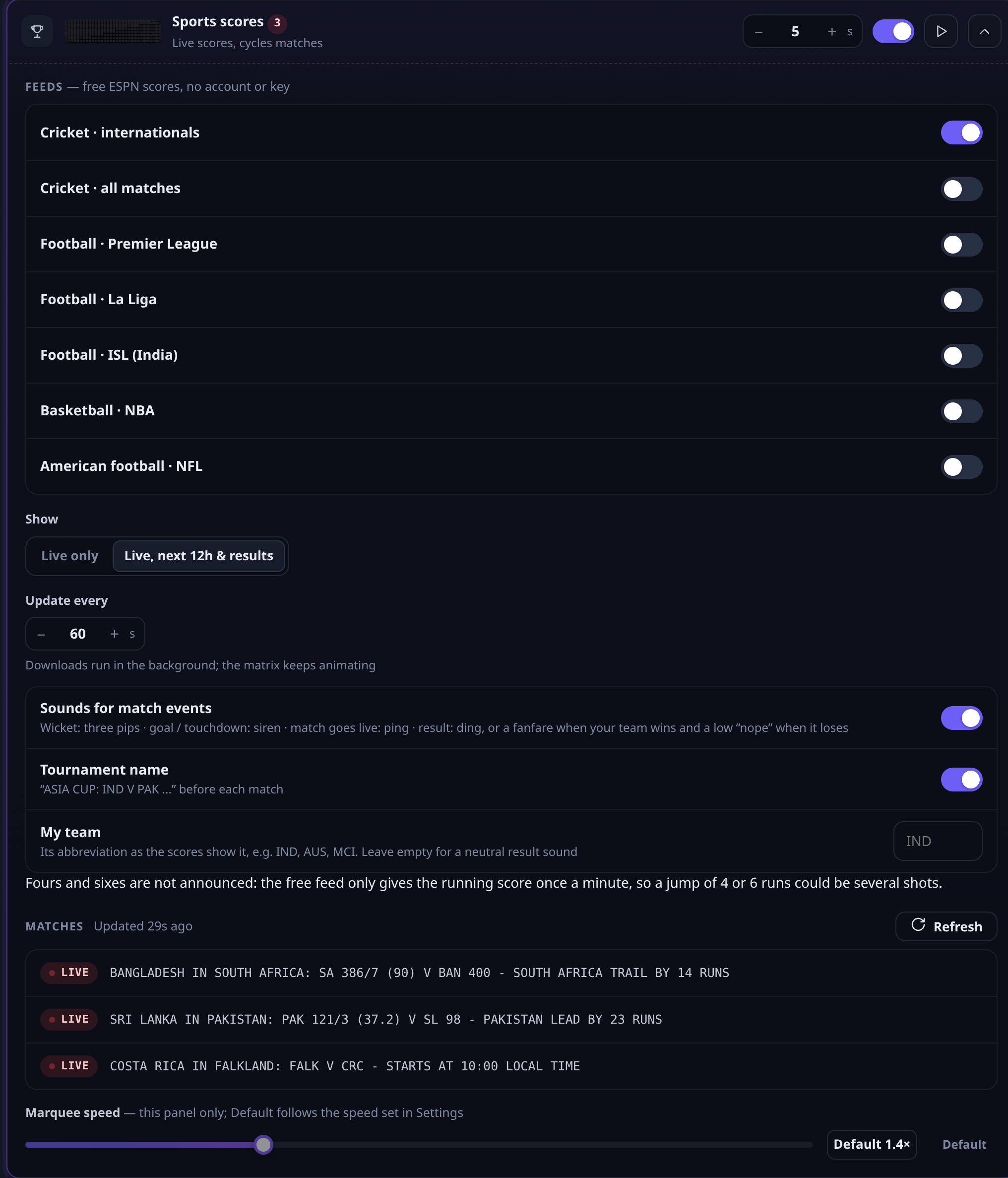
| Sports scores | Live cricket, football, NBA and NFL from free feeds, with sounds. §07 |
| Network info | The clock's IP address and name — handy when you need its address. |

04 · Clock, date & weather
1
2
3
4
5
6
7
8
Figure 04.1 — Weather panel, opened. The matrix reads GANDHINAGAR: SMOKY HAZE TEMP: 26C FEELS: 26C …
| Style | Big digits, or text in normal, bold, italic or wide. |
| Seconds | Adds :SS — in small digits on one display, full size on two or more. |
| 12-hour | 6:15 instead of 18:15. Also used by the world clock. |
| AM / PM marker | Two dots beside big digits (top = AM, bottom = PM), letters in text styles. Switch off for just the time. |
| Time zone | Under Clock; the clock sets itself from the internet. |
| Format | 12 formats, each previewed with today's date — TUE 17 NOV 2026, 17/11/26… |
| Display | Marquee scrolls; Static stands still and centred. Static is offered only when the format fits the display — the short formats fit one module. |
| Font | As for every panel. |

05 · Claude & Codex usage
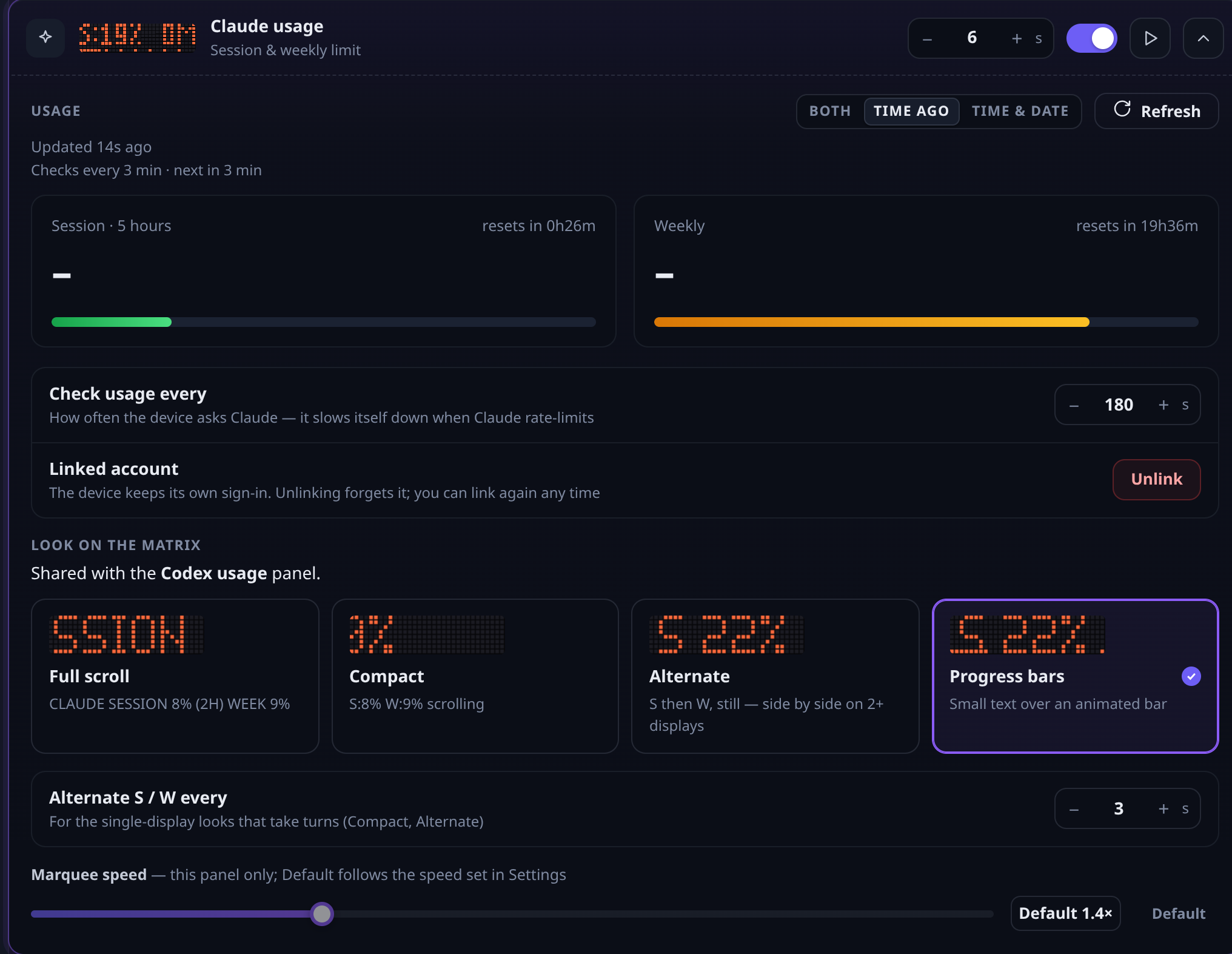
Link your account once. The clock then checks your usage every few minutes, by itself, and shows how much is left.
1
2
3
4
5
Figure 05.1 — Claude usage panel, opened, on a linked clock.
Open Codex usage and press Get code. The clock shows a short code; type it on the OpenAI page it links to. No copy-paste back: the clock links by itself once you approve.
| Full scroll | CLAUDE SESSION 8% WEEK 9% as a marquee. |
| Compact | S:8% W:9% scrolling. |
| Alternate | S, then W, standing still; side by side on 2+ displays. |
| Progress bars | Small numbers over an animated bar — the default. |

06 · News
1
2
3
4
5
6
7
8
9
10
11
Figure 06.1 — News panel, opened.
| World | BBC, NPR, CBC, Al Jazeera, DW, NBC News, NY Post, CNBC, CNA |
| India | Times of India, Economic Times, India Today, Hindustan Times, News18, Mint |
| Tech & AI | Hacker News, TechXplore, MIT Technology Review |
| Science | ScienceDaily, Phys.org |
| Gaming | IGN, Polygon |
| Your own | Any RSS feed URL (Custom RSS) |

07 · Sports
1
2
3
4
5
6
7
Figure 07.1 — Sports panel, opened.
| Event | Sound |
|---|---|
| Wicket | Three quick pips, and WICKET! flashes |
| Goal / touchdown | A siren, and GOAL! flashes |
| Match goes live | A ping, and LIVE NOW |
| Your team wins | A fanfare, and WE WON! |
| Your team loses | A low “nope”, and WE LOST |
| Other results | A ding, and RESULT |

08 · Settings
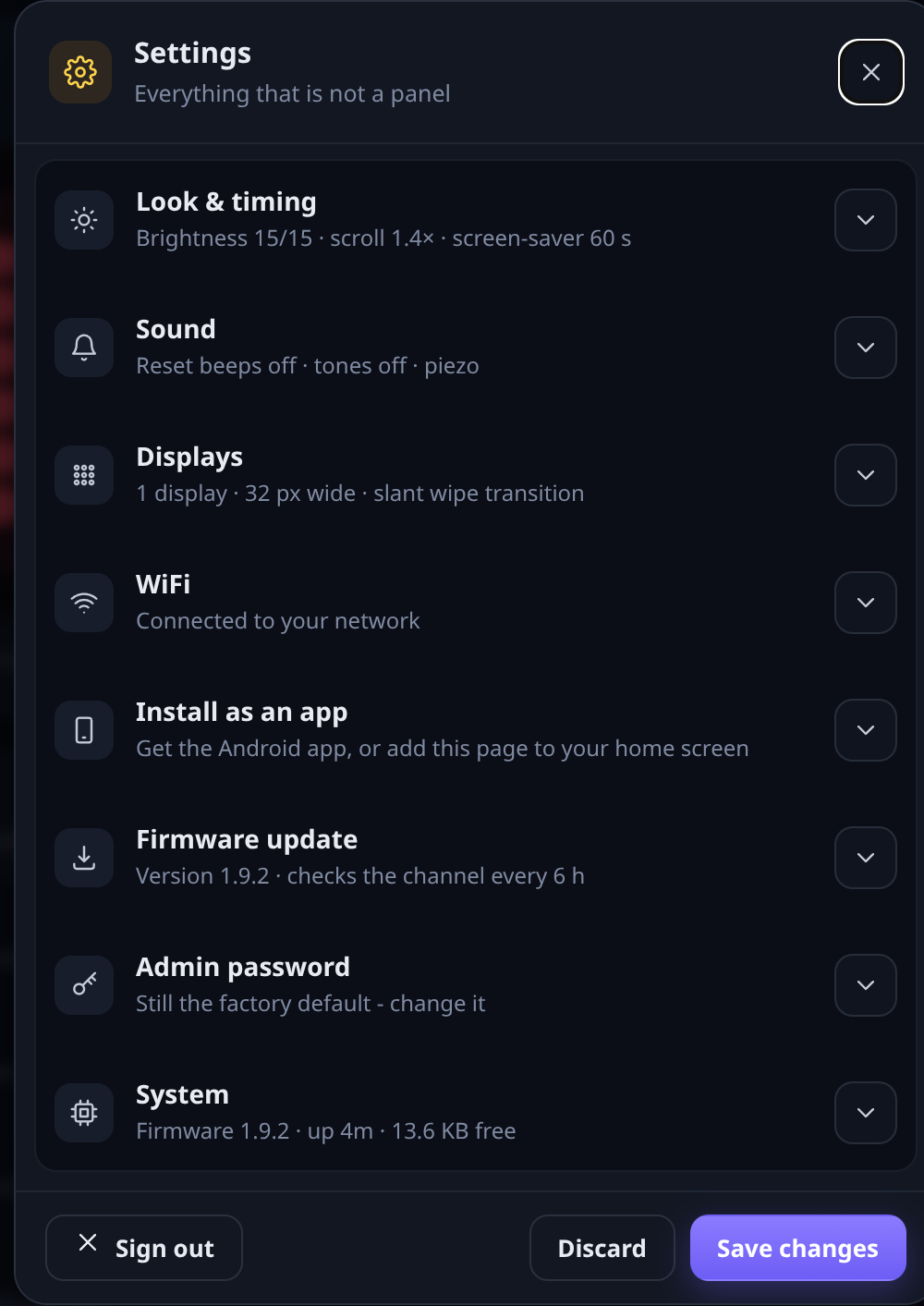
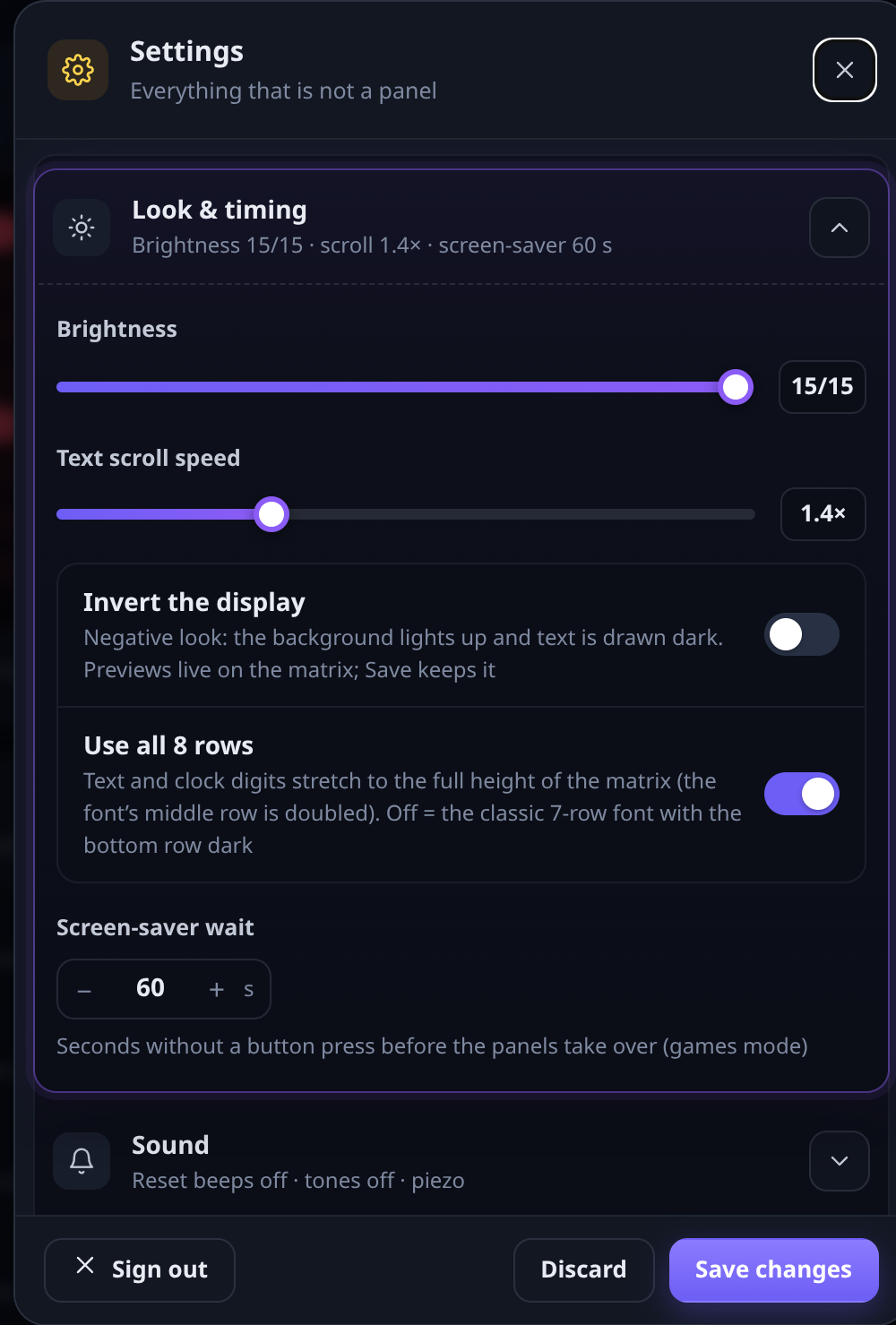
Open with the gear icon in the top bar. Each row opens with its arrow.
1
2
3
4
5
6
7
8
Figure 08.1 — Settings dialog.
1
2
3
4
5
Figure 08.2 — Look & timing, opened.
Under Firmware update, choose what happens when a newer version is published: Do nothing, Tell me here, or Install it automatically. Check now looks straight away. Settings are kept. While updating, the matrix shows a progress bar and ends with an animated tick.

09 · Phone app & network

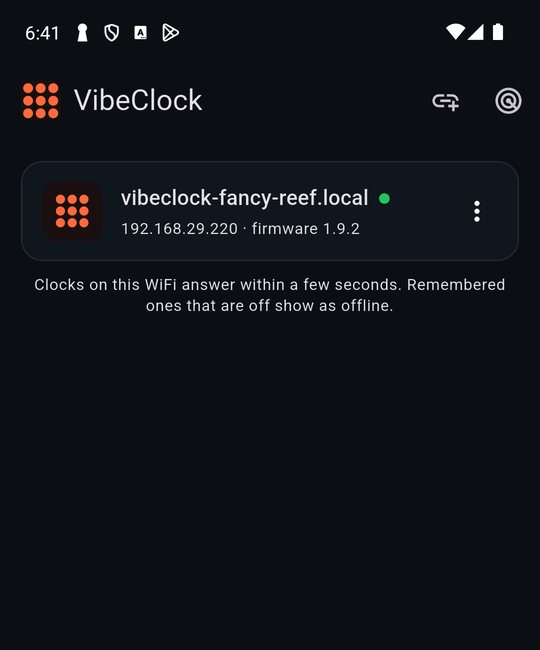
Figure 09.1 — The app finds every clock on your WiFi: name first, address and firmware below.

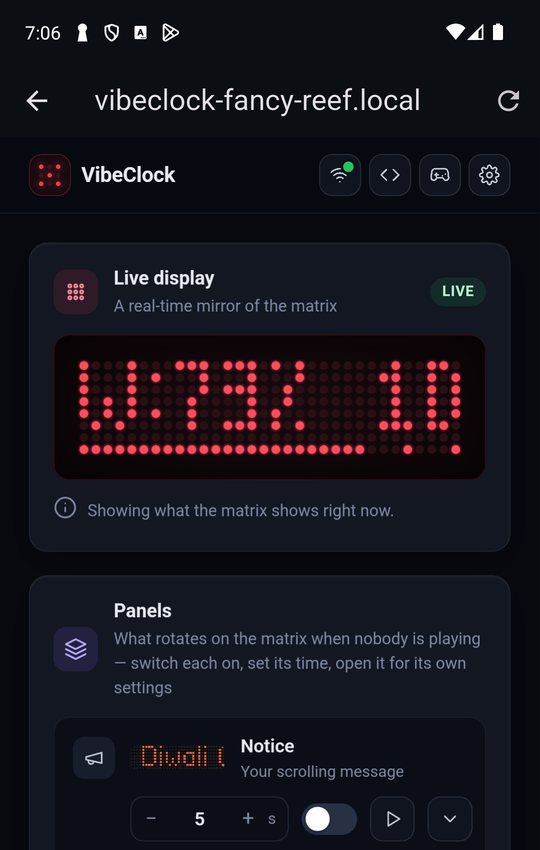
Figure 09.2 — One tap opens the clock's admin page inside the app.
| Get it | Free: scan the code for your phone below, or open hjlabs.in/vibeclock. Android may ask once to allow installs from your browser. |
| Finds clocks | By itself, every few seconds, three ways at once. No address to remember. |
| Add by address | The link icon: type an IP or .local name; kept only if a clock answers. |
| New clock | Set up a new clock walks you through the hotspot steps of §01. |
| iPhone | Coming soon. Meanwhile use Safari with the clock's address. |
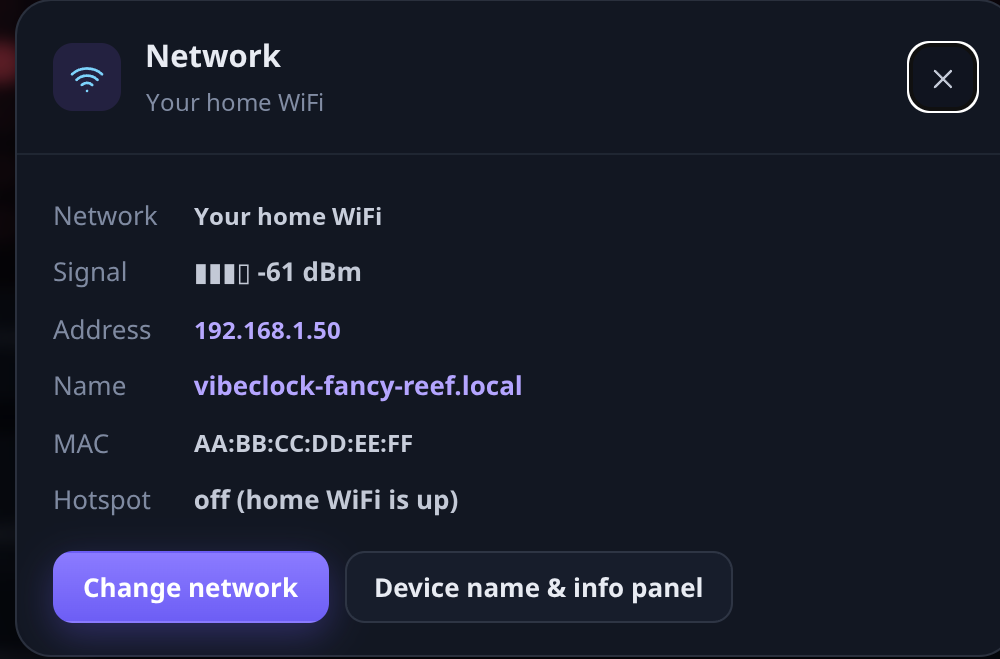
1
2
3
Figure 09.3 — The Network dialog (WiFi icon in the top bar).

10 · Text API, agents & arcade
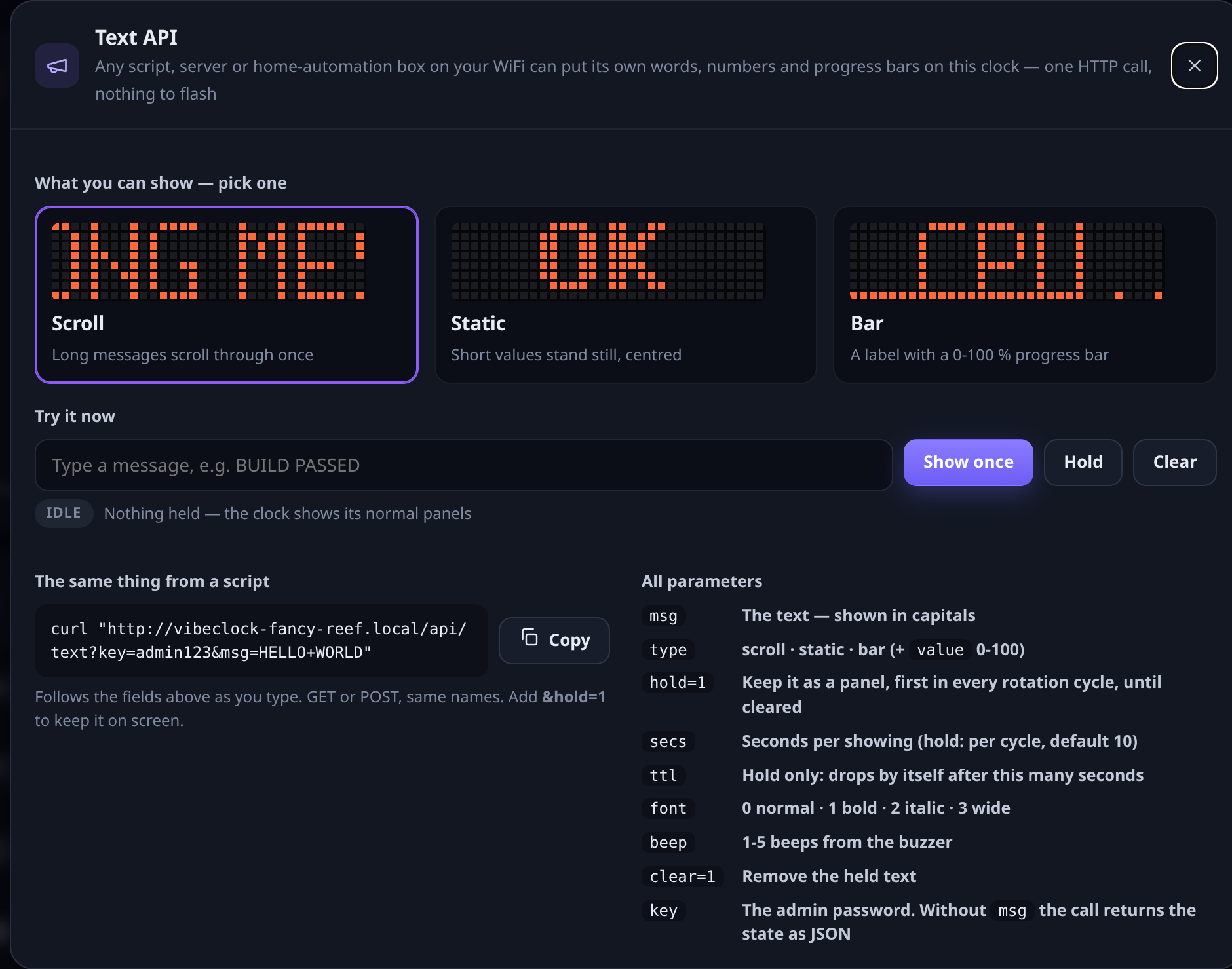
Anything on your network that can open a web address can put text, a progress bar or a sound on the clock. Open the </> icon for live examples with your clock's address.

Figure 10.1 — Text API dialog: pick scroll, static or bar, type a message, copy the ready command.
| Scroll | A message scrolls through once, then the panels carry on. |
| Static | A short value stands still, centred — a build number, a temperature. |
| Bar | A label over a 0–100% progress bar — a download, a training run. |
curl "http://vibeclock-office.local/api/text?key=PASSWORD&msg=BUILD+PASSED" curl "http://vibeclock-office.local/api/text?key=PASSWORD&msg=TRAINING&type=bar&value=42" curl "http://vibeclock-office.local/api/beep?key=PASSWORD&tune=win"

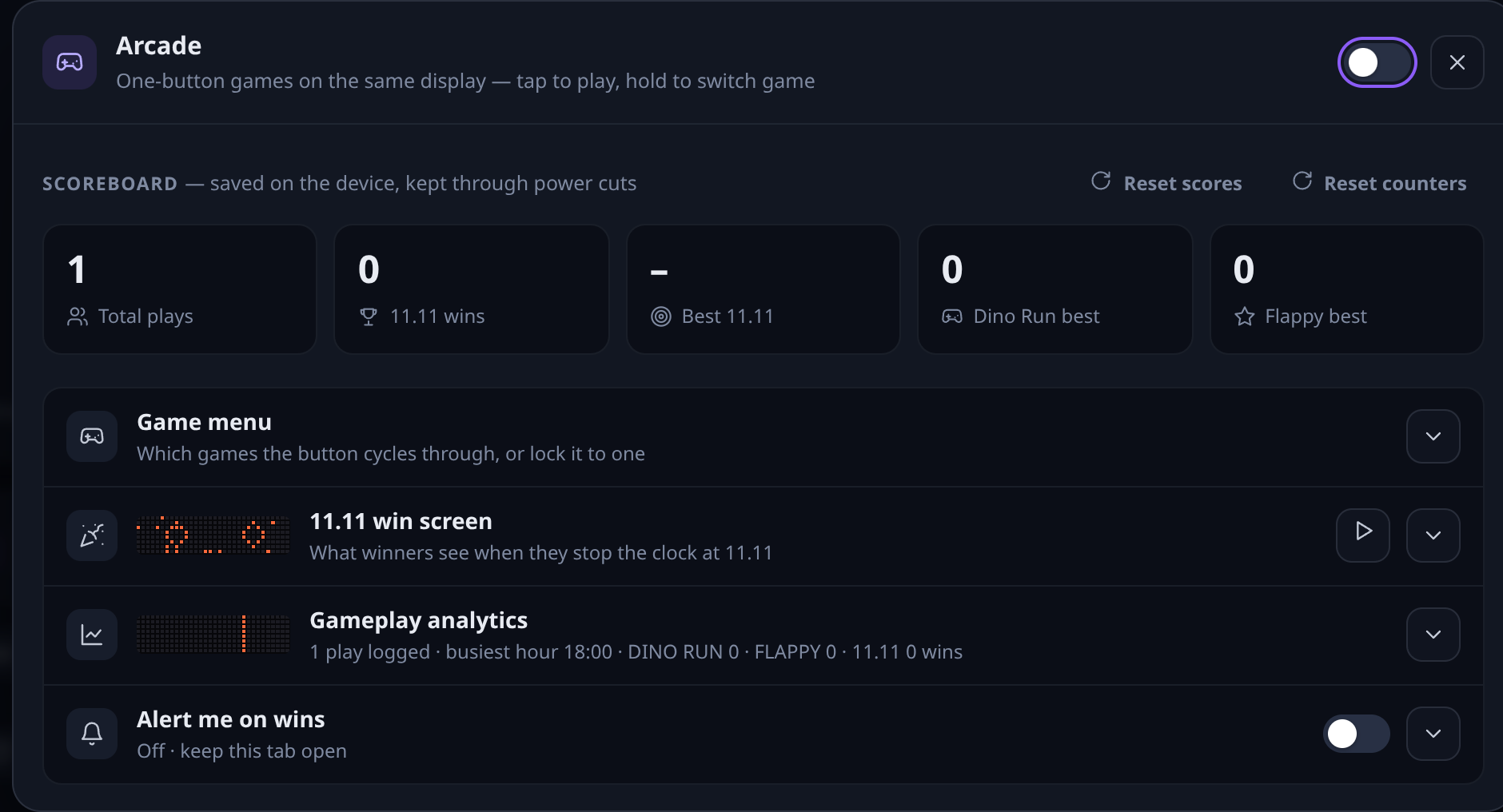
Figure 10.2 — Arcade dialog: scores, the game menu, win screen and analytics.
Three one-button games live on the clock: Dino Run, Flappy and 11.11, a reaction test where you stop the timer at exactly 11.11 seconds. Press the clock's button to play; the panels return after the screen-saver wait. Switch games on or off, pick a win effect and message, and see scores and play statistics in the arcade dialog.

11 · Troubleshooting
| Symptom | Likely cause and fix |
|---|---|
| Forgot the admin password | Restart the clock four times in a row: unplug it, plug it back in, and unplug again within 15 seconds — four times. The matrix scrolls ADMIN PASSWORD RESET TO admin123. Sign in with admin123 and set a new one. |
| Claude usage is old | Open Claude usage and press Refresh. If it says LOGIN EXPIRED – RELINK, link it again with Open sign-in. If it says network checks paused, the clock is short of memory: turn off panels you do not use (sports downloads are the largest). |
| News says FETCHING… for long | The first headlines can take a minute with many sources ticked. If it stays, press Fetch now; a source that keeps failing shows its error in the card. |
| Weather shows N/A | No place set, or not pinned: type your city or PIN code and tap a result so it says PINNED. |
| Wrong time | Set the time zone under Clock. The clock needs internet once to learn the time. |
| A panel never appears | Check its switch is on. Panels play in list order; long marquees make a full cycle longer. |
| Text reads backwards / displays out of order | With several modules: Settings → Displays → Reverse display order, then Test. |
| Can't open the admin page | Phone and clock must be on the same WiFi. Use the app, or the IP from the Network info panel. Guest networks often block devices from seeing each other. |
| The matrix says LOCKED | The clock is not activated. Send hjLabs the device id it shows; enter the code you receive on the admin page. |
| Flickers or resets | Use a 5 V adapter of at least 1 A and the supplied cable; avoid a laptop's USB port on battery saving. |
| Stuck after an update | Unplug for 10 seconds and plug back in. Settings are kept across updates. |
Visit hjlabs.in/vibeclock for the latest guide, the phone app and firmware. When you contact us, include the clock's name (from the Network dialog) and the firmware version from Settings → System.